QuickBooks Desktop + Neat Data = Power BI Heaven

QuickBooks Desktop + Neat Data = Power BI Heaven

Here at Neat Data, we’ve noticed something interesting: many companies are still deeply committed to QuickBooks Desktop. While Intuit pushes users to move to QuickBooks Online, there’s a loyal segment of the business world that prefers the Desktop version. Why? Because for many, Quickbooks Desktop offers faster processing and strengthened reporting capabilities. In simple words, you can say that it’s the system they know and trust.

But there’s a catch: QuickBooks Desktop is limited by its on-premise deployment model. That means your financial data lives on local machines or servers, which can make sharing insights with remote teams, executives, and non-QuickBooks users difficult. That’s exactly where Neat Data steps in.

Enter Neat Data: Seamless Power BI Dashboards for QuickBooks

Whether you’re managing a B2B sales force, running a distributor operation, or just dealing with high-volume transactions, Neat Data gives you the ability to bring your QuickBooks Desktop data to life in Power BI. In short, Power BI can be a game changer without messy imports or hours of manual setup.

We’ve built pre-configured dashboards that connect with your QuickBooks Desktop data out-of-the-box. That means:

  • No complex data modeling required.
  • No reinventing the wheel.
  • Just clean, visual insights from day one.

Power BI in the Cloud — For Everyone

Best of all, Neat Data makes these dashboards accessible in the cloud, making it accessible to anyone in your organization.

Even if your finance team is working in QuickBooks Desktop locally, your sales team, managers, or executives can access interactive dashboards anytime, anywhere, in real-time with no QuickBooks login required.

It’s the perfect solution for companies who need:

  • Robust accounting features from QuickBooks
  • Cloud-based reporting and company- wide visibility
Part 2 : Extend Your ERP Third-Party Add-on Solutions

Part 2 : Extend Your ERP Third-Party Add-on Solutions

Inventory management for your business is a balancing act. Too much stock will limit your capital; too little will impact sales and customer satisfaction. 

But what happens when your ERP system fails to meet your inventory needs? 

Fortunately, you don’t have to replace your entire ERP system. You can simply extend its functionality using third-party add-ons. In this blog, we’ll explore common inventory management challenges and how third-party solutions can help you tackle these issues.

This article is part 2 in our series Extending the Value of your ERP:

  1. How to Solve Them with Business Analytics
  2. Extending Your ERP’s Capabilities with Third-Party Add-on Solutions
  3. Best of Breed Strategy vs. New ERP Investement

Why Inventory Management is Challenging

Any company handling physical products must first focus on inventory control and eliminating its challenges.

It influences overall operational efficiency, customer satisfaction, and cash flow. However, traditional ERP systems could lack the specific features required to manage the whole complexity of inventory control. 

Common inventory challenges include:

1. Forecasting Demand Accuracy

While challenging, demand forecasting is absolutely vital for your business’ inventory management. Even minor errors in calculation can cause overstocking or stockouts.  Standard ERPs might provide basic forecasting to tackle these challenges. However, many models lack comprehensive tools to study seasonal fluctuations, market trends, and advertising impacts.

2. Tracking Real-Time Inventory

Maintaining real-time inventory tracking across several sites can be difficult. This is especially true with traditional ERP systems that only update inventory levels periodically. Without real-time visibility, making quick decisions is difficult, leading to inefficiencies and missed opportunities during your inventory management.

3. Automating Replenishment and Order Management

Not only are manual reordering and restocking procedures time-consuming, but they also run a risk of mistakes. Your ERP system’s lack of automation causes your staff to waste time on jobs that could be automated, therefore compromising their capacity to concentrate on more strategic work.

4. Integrating Data from Multiple Sources

Data from many sources—sales channels, warehouses, suppliers, and more—forms the basis of modern inventory management and control. Most ERPs create silos that limit the view of your whole inventory ecosystem since they are not meant to manage these complex integrations naturally.

The Benefits of Third-Party Add-ons for Inventory Management

Third-party add-ons offer numerous advantages when it comes to managing inventory effectively within your ERP. 

  • Scalability: Add-ons can grow with your company and offer sophisticated inventory control tools without upgrading your ERP.
  • Cost-effectiveness: Typically speaking, add-ons are less expensive than a complete ERP overhaul. They let you handle particular problems related to inventory management without having to commit time and money to redesign the whole system.
  • Customization: Many outside solutions offer industry-specific customization choices that allow you to tailor them to your company’s particular needs.
  • Reduced Dependency on IT: Many add-ons enable non-technical workers to control and monitor inventory, without continual IT support, by means of user-friendly interfaces and self-service reporting.
  • Improved Decision-Making: The information gathered from many add-ons offers practical understanding. Based on thorough, real-time data, you may make better decisions about inventory management, levels, buying, and sales policies.

Choosing the Right Add-on for Your Inventory Management Needs

When selecting an add-on solution, it’s essential to consider your specific inventory management challenges and goals. Here are a few tips for choosing the right solution:

Choosing an add-on solution requires you to take your particular inventory issues and objectives into account. These guidelines will help you select the appropriate solution:

  • Assess Compatibility: Make sure the add-on offers flawless integration and fits your ERP system.
  • Review Functionality: Search for features like demand forecasting, automation, or multi-location tracking that directly meet your demands.
  • Consider Scalability: Select a solution that will evolve with your company, offering more features and capabilities as you grow.
  • Test Usability: Choose a tool your staff finds simple to operate. Easy solutions cut training time and increase adoption.

Conclusion

Inventory management challenges can strain your operations and impact profits. You can now extend the capability of your ERP system with external add-ons to maximize operations, reduce expenses, and improve customer satisfaction.

Download our entire white paper, “Extending the Value of Your Current ERP with Business Analytics,” for more ideas. It addresses other techniques and doable fixes to enable you to utilize the ERP fully.

Part 1 : Solve Your ERP Pain Points with Business Analytics

Part 1 : Solve Your ERP Pain Points with Business Analytics

ERP systems are the foundation of any successful business, but they’re not without challenges. 

You will notice your ERP systems slowing down or failing to keep up as your business grows. However, the answer doesn’t lie in purchasing a new system altogether. Instead, you can often extend the value of their existing ERP via business analytics. 

In this blog, we will discuss some common ERP systems’ pain points and how business analytics can help resolve them.

This article is part 1 in our series Extending the Value of your ERP:

  1. How to Solve Them with Business Analytics
  2. Extending Your ERP’s Capabilities with Third-Party Add-on Solutions
  3. Best of Breed Strategy vs. New ERP Investement

Understanding the Pain Points in the ERP System

ERP systems are the backbone of many organizations. This software helps centralize operations and streamline processes. 

However, even with all their benefits, ERP systems come with their own set of issues. 

1. Data Accessibility Issues

Many times, employees find it difficult to rapidly retrieve relevant information. Traditional ERP system reporting makes it difficult for team members to get real-time insights. This latency influences decision-making since leaders might not have a current perspective of essential metrics.

Solution: Real-time data and more flexible reporting made possible by analytics systems help to create on-demand insights. Visual dashboards and real-time measurements, for example, enable teams to make quicker, data-based choices.

2. Slow Data Processing and Reporting

Particularly in high-demand reporting seasons, outdated ERP systems can have long data processing times. Teams depending on current data for strategic planning find great annoyance in this latency.

Solution: Tools for business analytics shine in quickly handling big data volumes. Using analytics on top of your ERP system will enable quick, accurate reporting without requiring a complete ERP revamp.

3. Manual Data Entry and Errors

One main reason for mistakes in data management is manual data handling. Human error in data entering might produce discrepancies that affect general performance and reporting.

Solution: Business analytics helps to automate data collecting, therefore lessening dependency on labor-intensive procedures. Automation saves time and reduces mistakes so staff members may concentrate on more critical tasks. 

4. Lack of Real-Time Visibility

Getting real-time understanding of important indicators presents difficulties for many companies. In fast-moving settings where quick information availability is essential, this disparity can especially be problematic.

Solution: Layering analytics over your ERP system gives you real-time data access, so facilitating more dynamic company reactions. Custom dashboards can provide KPIs, trends, and insights keeping everyone in the knowledge.

Integrating Business Analytics for Greater ERP System Value

So, how exactly can business analytics extend the life of your ERP? Here are some specific ways:

Enhanced Reporting and Dashboards

Most ERP systems have basic reporting, but they often lack the depth required for complex analyses. Custom reports and dashboards by business analytics solutions let firms quickly display particular insights and KPIs. Visualizing data helps you to rapidly spot trends, patterns, and outliers, therefore facilitating data understanding and application.

Automation of Routine Processes

By automating repetitive tasks, business analytics technologies help to save time spent on report generation and human data entering. Automation in inventory updates, performance monitoring, and expenditure reporting, for examples, lowers human error and accelerates standard procedures.

Advanced Forecasting

Analytics improves ERP system capability using data-driven forecasting. Forecasts of future inventory demands, sales patterns, and cash flows let companies make proactive decisions. This forecasting based on analytics helps businesses to predict to anticipate needs rather than just reacting, so offering a competitive advantage.

Real-World Example: Addressing Inventory Challenges with Business Analytics

Imagine a retail business whose reporting limits cause inventory visibility problems. They’re unable to forecast demand accurately, often leading to overstocking or stockouts.

The startup combines a business analytics platform that gathers inventory data and links it with sales forecasts instead of replacing your ERP system. 

These days, they can precisely estimate future needs, track inventory in real-time, and change orders based on this information. They not only cut expenses but also raise customer satisfaction by exactly satisfying demand.

Avoiding a Costly ERP System Replacement

Changing an ERP can interfere with daily operations, be time-consuming and expensive. Business analytics add-ons, on the other hand, are less disruptive, more reasonably priced, and easier to apply. Your present ERP can be transformed by analytics, so providing many of the advantages of a new ERP without the high cost.

Conclusion: The Power of Your ERP System

Unlock the full potential of your ERP with advanced business analytics. Download our white paper, ‘Extending the Value of Your Current ERP with Business Analytics,’ to discover practical insights, detailed strategies, and expert recommendations for maximizing ERP efficiency and performance—without the cost and disruption of a new system. 

Why Smart Companies Rely on Pre-Built Dashboards and Analytics

Why Smart Companies Rely on Pre-Built Dashboards and Analytics

In today’s data-driven business landscape, the ability to make quick, informed decisions is a cornerstone of success. Companies with the right tools in place can identify opportunities, mitigate risks, and stay ahead of the competition. But how do the smartest companies achieve this edge? Increasingly, they’re leveraging pre-built dashboards and analytics solutions. Here’s why opting for a pre-built approach is not just smart—it’s transformative.

The “We Could Build It Ourselves” Dilemma

When meeting with prospective customers, we often hear, “We could build these Power BI dashboards ourselves, but our technical staff is busy with pressing priorities.” It’s a valid point—your technical team is likely stretched thin, focusing on mission-critical projects that keep your business running. While building custom dashboards may seem feasible in theory, the reality is often far more challenging. Resource constraints, shifting priorities, and the time-intensive nature of dashboard development can stall even the most well-intentioned projects.

We could build these Power BI dashboards ourselves, but our technical staff is busy with pressing priorities. The business is pushing my team to build out analytics, but to be honest, that gets pushed to the side when my team is putting out IT fires.

VP of IT

Regional Food Distributor

That’s where pre-built dashboards come into play. They’re designed to eliminate these roadblocks, allowing your team to focus on what they do best while delivering actionable insights from day one.

The Value of Expertise

Creating dashboards that are truly effective requires more than just technical know-how. It demands a deep understanding of the data, the industry, and the business challenges being addressed. Pre-built dashboard solutions offer:

  • Industry-standard: Built on best practices tailored for industries like food wholesale, telecommunications, and warehouse operations.
  • Comprehensive: Covering a wide range of business needs, including sales, procurement, inventory, receivables, payables, and financial reporting.
  • Beautifully Designed: Visualization matters. Pre-built dashboards are crafted to be intuitive and aesthetically pleasing, ensuring that critical insights are easily accessible.

By choosing pre-built dashboard, you’re benefiting from the expertise of a team that has spent years refining the best way to present information that drives decisions.

Faster Time to Value

Building dashboards from scratch can take weeks or even months. With pre-built dashboards, the time-to-value is significantly shorter. Instead of waiting for internal teams to design, test, and iterate, your organization can start leveraging insights immediately. This speed is crucial in fast-paced industries where delays in decision-making can lead to missed opportunities or costly inefficiencies.

A Managed Data Pipeline

Dashboards are only as good as the data that feeds them. Pre-built dashboard analytics solutions often manage the entire data pipeline, from data extraction and transformation to loading it into visualization tools. This end-to-end approach eliminates the headaches of maintaining data infrastructure and ensures your team has complete confidence in the numbers.

Focus on Your Core Business

Every hour your team spends building dashboards is an hour not spent driving revenue, improving customer experiences, or innovating in your core areas of expertise. By opting for pre-built dashboards, you free up valuable internal resources to focus on strategic initiatives. In the long run, this focus can have a far greater impact on your bottom line than attempting to reinvent the wheel.

Not Necessarily a Complete Solution, but a Solid Starting Point

Pre-built dashboards offer a solid foundation, even if they don’t include every specific KPI or report your business might need. They’re designed to address the most critical metrics and provide a starting point for deeper analysis. Think of it as a head start—you’re equipped with a robust framework that can be customized further to meet your unique requirements. This approach ensures you’re operationally ready from the start while leaving room for flexibility and growth.

A Smart Investment

Developing custom dashboards in-house might seem cost-effective at first glance, but the hidden costs—in time, resources, and missed opportunities—can quickly add up. Pre-built dashboards offer a better return on investment by delivering immediate value, reducing development costs, and ensuring scalability as your business grows.

Conclusion

The smartest companies understand that success isn’t just about having data; it’s about making that data actionable. Pre-built dashboards and analytics solutions provide a fast, reliable, and expertly designed way to turn raw data into meaningful insights.

How Neat Data Can Help

At Neat Data, we specialize in delivering pre-built dashboard solutions that drive your business success with powerful analytics. Our dashboards are industry-standard, comprehensive, and beautifully designed. We manage the entire data pipeline, so you don’t have to. By choosing Neat Data, you’re not just investing in dashboards—you’re investing in the future of your business. Contact us to learn more and schedule a demo.

Evolution of a Dashboard: Using Iterative Development For Strategic Data Visualization

Evolution of a Dashboard: Using Iterative Development For Strategic Data Visualization

Today I’ll be presenting how we apply iterative development when creating dashboards. I have a few goals:

  • Show an example of a strategic dashboard, focusing on high-value data points that address specific goals
  • Sprinkle tips and tricks throughout for building dashboards that are easy to use and nurture data culture
  • Illustrate the customer experience with Neat Data using iterative development to build strategic dashboards quickly

To meet these goals I’ll be sharing one Dashboard Story: an example of how Neat Data helped one of our customers develop a strategic dashboard for their customer service department over 3 iterations.

I’m excited about this blog post! My favorite thing to do is play with data, and I got to do a lot of that in preparation. Before we begin, a few thoughts on data visualization and iterative development…

Data Visualization Strategy

A few years ago I was chatting with a woman who had a career designing dashboards, reports and other information visualizations. She mused that after being asked over and over again what she does for a living, one day she responded with, “I make pretty data!” This was her go-to response from that day forward.

This sticks with me as I spend my days creating Neat Data information dashboards for clients and training them to create their own. Sometimes I include the phrase #MakePrettyData, giggle to myself, and remember the story of the information visualization professional years ago.

Of course, making data pretty isn’t what’s most important, but it is important. The adage “it’s both an art and a science” certainly applies to dashboard design.

First, the information presented in the dashboard must meet the end user’s requirements. A dashboard that has meaningless charts, values that do not hit the mark, or extraneous visualizations is a failure.

Second, the information presented must be balanced on the screen, arranged visually, and used colors consistently.

Let’s keep this concept in mind as we walk through this Dashboard Story that illustrates the evolution of a dashboard designed for strategic use. “Evolution” is a fitting term as it fits into our iterative business analytics approach. Every dashboard we build starts with a basic exploration of a few data points and then quickly evolves into a useful solution that meets the customer’s specific need.

Using Iterative Development To Build Strategic Dashboards

We always use iterative development when working with our customers to develop strategic information dashboards, data visualizations, and reports. How our data analysts approach iterative dashboard development: 1) customer requests, 2) our data expert build, 3) the data expert shares new solutions for customer review, and then the cycle repeats with 1) more change requests. A few reasons why we love iterative:

  • SPEED: Iterative development needs much less planning (if any) compared to traditional project management. Our data experts need very little information from our clients to get started. Iterative development also has a quick turnaround from our data analysts. Our customers do not have to wait more than a few business days to get a new or updated solution based on their requests.
  • COLLABORATION: The process of requests, builds, and reviews creates an empowering environment for our customers. The first iterations offer a great learning experience to become familiar with their data and how they can view and manipulate it. As they continue developing dashboards with their Neat Data expert, their confidence and understanding naturally grow.

Now the fun begins!

Dashboard Story: Customer Interactions

This dashboard story includes 3 iterations, with an extra 4th iteration that shares additional options and a discussion about the customer’s next steps. It is worth noting that while we may ‘finish’ a dashboard in so far as the iterations end, change requests are always welcome from the customer.

From here on out, I’ll be using ‘The Company’ when referring to our customers (so we don’t confuse our customers and our customer’s customers). Before starting the build, the Neat Data expert asks The Company’s business expert and leadership a few quick questions:

What will this dashboard be used for? Will it align with a specific strategic goal?

This question is as much for The Company’s benefit as it is for Neat Data’s. It helps the Neat Data expert understand what this dashboard will address and how they can apply their expertise to create a valuable end-product. In this case, The Company replied with, “This will be the first in a series of dashboards relating to tracking and measuring the performance of our customer support department. We have a number of goals to address, and will probably focus on short-term or long-term analysis to start.”

Who at the company should have access to the data? Who owns this dashboard?

The Neat Data expert will use this information to set up security permissions for internal users, as needed. The Company responded with the names of team members who should have access to the dashboard as well as the name of the dashboard’s strategic owner.

Which business systems can this data be found in?

We ask this as a fail-safe to make sure we include data from all applicable systems when creating reports for the dashboard. The Company provided specific names of the systems that include customer support data, but I’m going to list the systems by function for the purposes of this post, “Our customer support data can be found in our website chatbot service, online support forms, email marketing, customer support CRM, and call center software.”

Iteration #1: A Quick Build

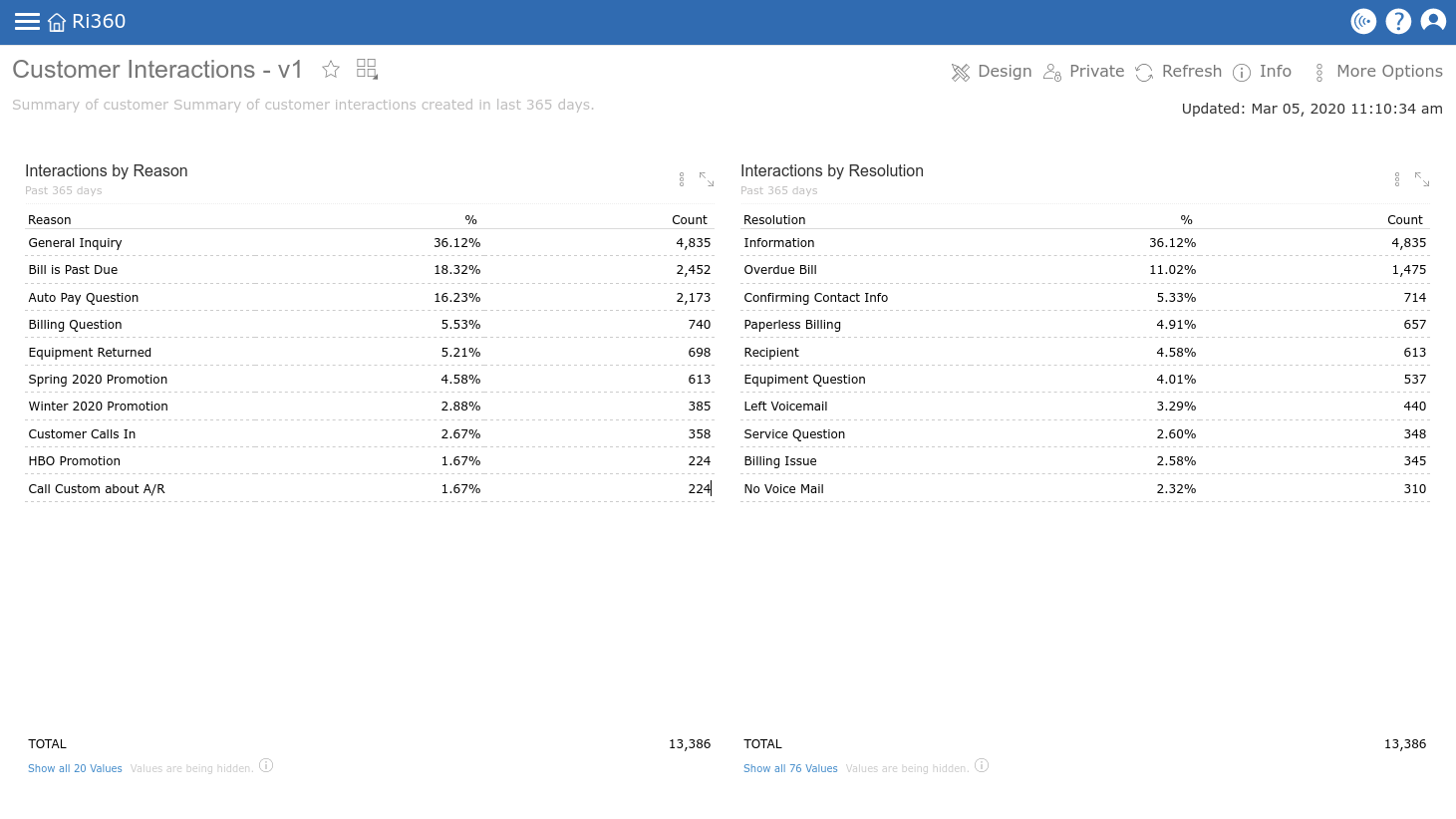
Step 1: Requests | The business expert at The Company requested two things for the first iteration: that the dashboard shows activity counts by reason (1) and resolution (2). Since The Company hadn’t seen the data yet, their request was broad and intended to provide guidance to the Neat Data expert so their returned solution had a goal.

At this point, Neat Data wants to get data in front of The Company as soon as possible so they can start evaluating the information and establishing what they care most about.

Step 2: Build | An effective way to summarize categorical data such as “Reasons” and “Resolutions” is the pivot table. A pivot table is essentially a top-10 list. They are informative and many business users prefer the detailed view of a pivot table.

For the first iteration of the dashboard we simply place two single value pivot tables — again, think “top 10 list” — on the canvas. This allows the business user to get a grasp of the data volume and data breakdowns.

The first iteration provided to The Company by the data expert. First iterations typically have the fastest turnaround from Neat Data, usually within 1 business day.

Step 3: Review | The Neat Data expert quickly returns a basic dashboard that addresses The Company’s two requests. After receiving the first iteration, the business expert and leadership at The Company review the dashboard. The new dashboard encourages them to explore their data and Neat Data’s capabilities.

Upon receipt of the dashboard, the first iteration is complete and we move on to the second iteration cycle, which will include feedback and requests from The Company.

Iteration #2: More Clarity

Step 1: Requests | With the second iteration, The Company better understands what they are looking for / care most about from a strategic standpoint. They requested the following for the next iteration:

  • How does the interaction count change over time
  • Additional visualization options for “reason” and “resolutions” breakdowns

Step 2: Build | I love pivot tables as much as the next data nerd, but The Company’s request for visualizations is understandable. Charting is an invaluable part of dashboard design – seeing patterns at a quick glance can only be done with visualizations.

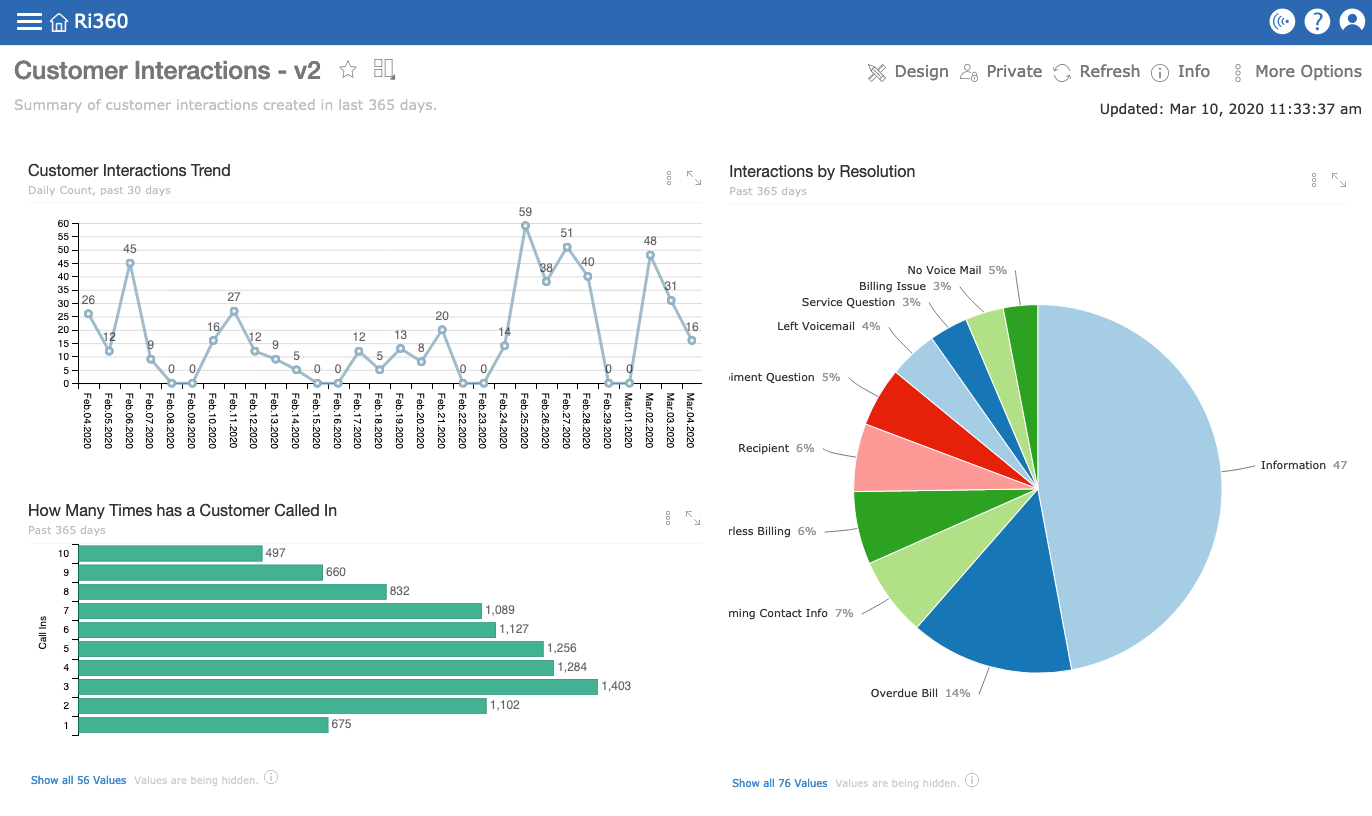
Per The Company’s request, we switch out the “reasons” pivot table for a trend line showing daily interaction counts. Next, we change the “resolution” table on the left to a traditional pie chart for a graphical representation of the top 10 list and immediately one can see that a single resolution is dominant.

We also built a new bar chart using a third pivot table that quantified customers based on how many times they had called the support department in the last 365 days.

The second iteration of the Customer Interactions dashboard provided to The Company.

Step 3: Review | Once again, the Neat Data expert shares the newest iteration of the dashboard with The Company’s business expert and leadership. The stark difference between the first and second iterations is quickly apparent. For The Company, seeing the same information represented in a different way and seeing new information (i.e. the bar chart), keeps the business analysis gears turning.

The Company chooses to take a bit more time in its review of this iteration to fine-tune its strategic goals for customer interactions. The second iteration is complete, and the Neat Data team waits for the next round of change requests from The Company.

Iteration #3: Final Changes

Step 1: Requests

While The Company strategically reviews their dashboard, it revisits the initial questions the Neat Data expert asked, “What will this dashboard be used for? Will it align with a strategic goal?”

The Company’s business expert and leadership collaborate to document their strategic goal for this dashboard:

This dashboard will track long-term customer interaction trends. At minimum, it will be reviewed during weekly meetings with support staff; and monthly meetings with the executive support and operations teams.

Its purpose is to measure interaction volume over time, interaction reasons, interaction methods, and interactions by support representative. This data will help us make informed decisions with staffing, staff training, which support methods to invest in, and more.

The business expert sent the above description to their Neat Data expert, and we got to work.

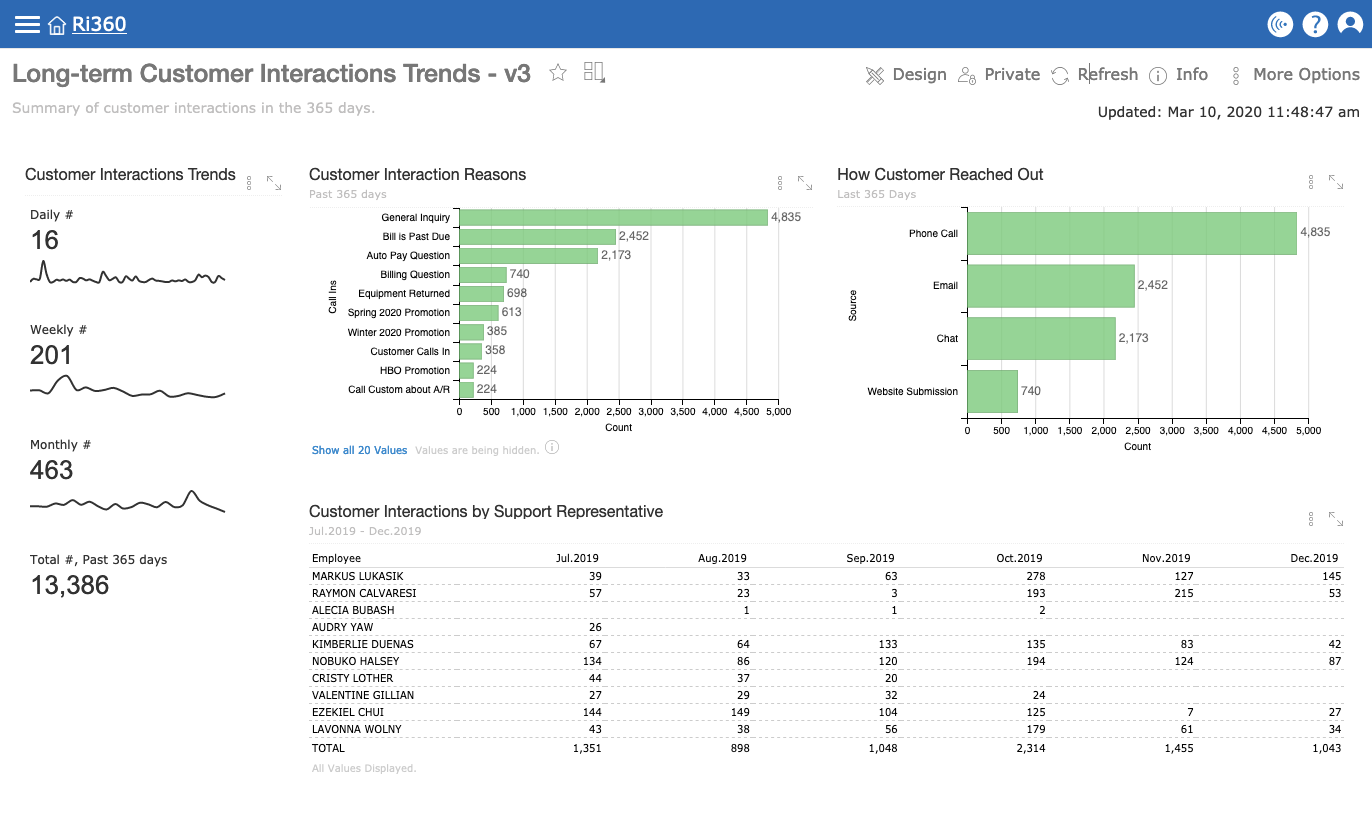
The third iteration of the Customer Interactions dashboard.

Step 2: Build

We started by changing the Customer Interactions Trend chart to a series of sparklines that show interaction volume by Day, Week, Month, and Total # for the past year. Each of these values can be analyzed in more detail using Neat Data’s data levels feature, but the goal for this dashboard is at-a-glance information.

Next, we changed the “reasons” pie chart to a bar chart so The Company can easily see volume comparisons (as opposed to percentages).

We switched the “How many times has a customer called in” bar chart to the “How Customer Reached Out” bar chart to address The Company’s request to measure interaction methods.

For the bar charts, we used the same green color to indicate that the value it is measuring is the same (customer interaction counts).

Finally, we created a new pivot chart (Top 10 List) of The Company’s support representatives by interaction volume month over month.

Step 3: Review

The Neat Data expert finishes the latest changes to the dashboard within a few business days. This time we schedule time to meet with The Company’s business expert to share the newest iteration.

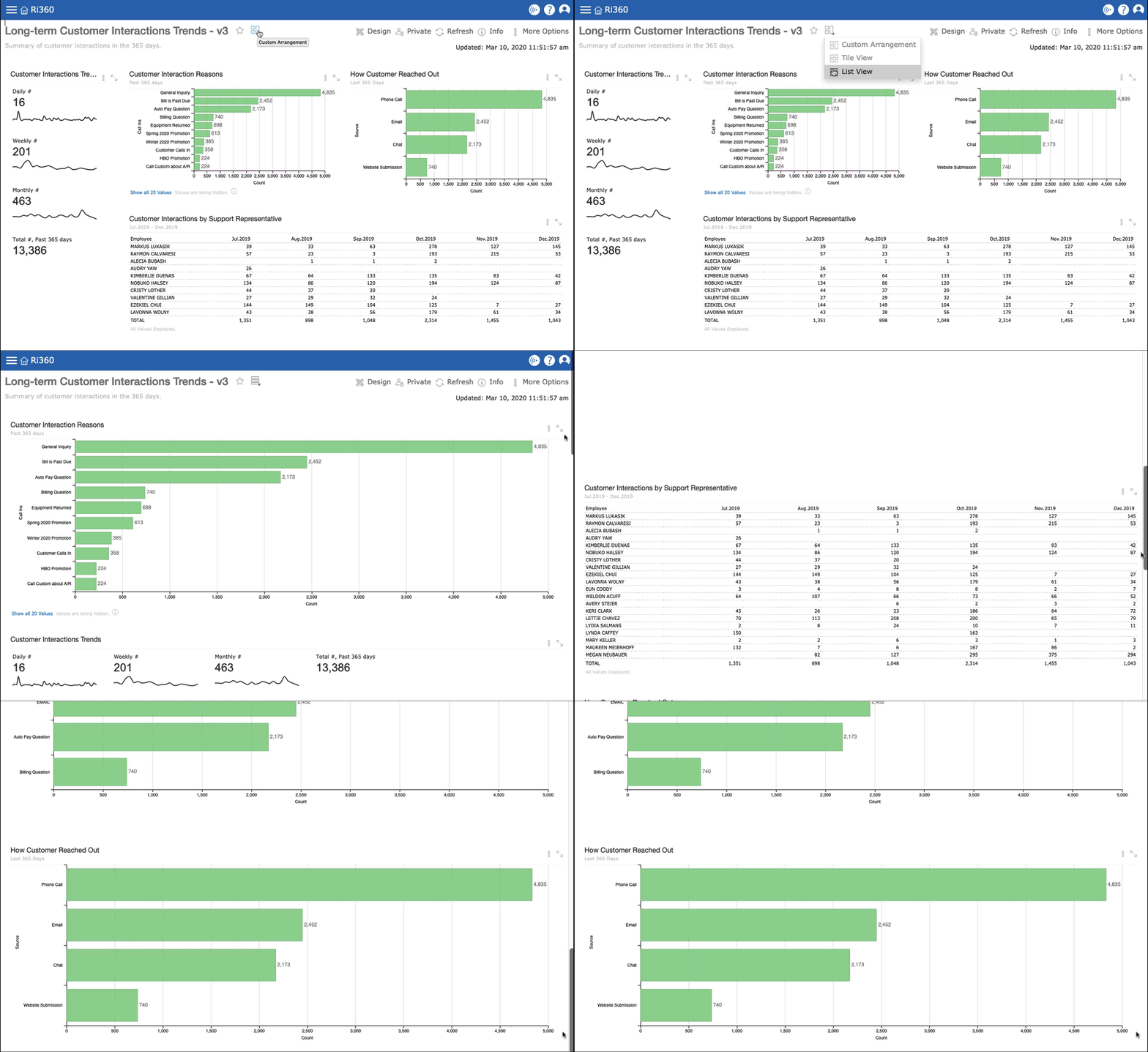
While on the call we also educate on a few Neat Data features that will come in handy while reviewing the dashboard on their weekly and monthly calls, such as data levels and summary analysis. We also show how to adjust time frames within reports and how to change the dashboard view from Custom Arrangement to List View.

With Neat Data’s “View” feature, you can toggle between Custom Arrangement, List View, and Tile View of all your dashboards. You aren’t limited by the space on the screen when arranging a dashboard.

As usual, the ball stays in The Company’s court as they review the newest dashboard. Once the business expert has reviewed the dashboard with leadership, they let us know that they are happy with where the Long-term Customer Interactions Trends dashboard is at and that it is ready for use.

Additional Options and Next Steps

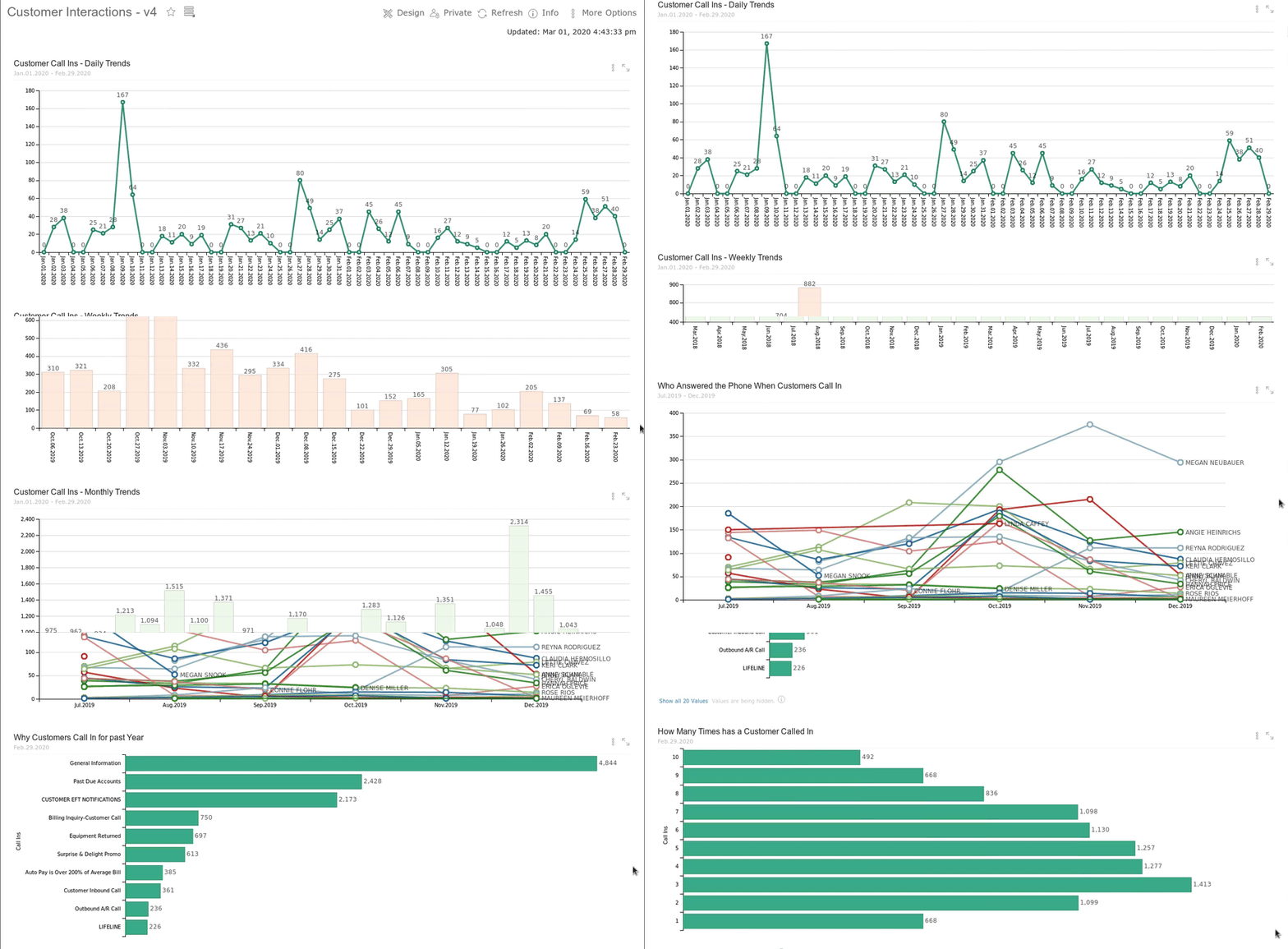
As an example, I want to share another way to present the same data. The options for reporting and visualizing data are limitless. Iterative dashboard development is a high-impact methodology that helps Neat Data customers decide how they prefer to consume information.

The same customer interaction data from previous iterations visualized in different ways.

Next Steps | Now that the “long-term customer interactions trend” dashboard has been completed; The Company is ready to build a second dashboard – but this time with a short-term focus. They send the request to their Neat Data expert: “For our second customer support dashboard, we will focus on short-term (daily/weekly) performance to keep a pulse on the support department, how it is performing, and other strategic focus areas for short-term monitoring and response.”

Building off of the first dashboard, the Neat Data data team gets to work once more. And the iterations continue.

Final Thoughts

It goes without saying (but I’ll say it anyway) that Kevin and I are very proud of our highly skilled and experienced data team and the services we provide. Our top priority is ensuring our customers get value from their data quickly and easily. When our data experts manage the technical aspects of Neat Data, it allows our customers to focus on their data and their business analytics goals.

A few parting thoughts on iterative development for business analytics dashboards and data visualizations:

  • Iterative development is best whether you have a data analyst or not. Work quickly, and don’t overthink/over-plan. Seeing the data helps business experts and leaders figure out what they want / like / see value in.
  • Focus on visualizations that add value and emphasize the data, visualizations do not need to be flashy for the sake of flashiness.
  • It is important to think critically and strategically when building dashboards: who is using it? how often? Why is it important? There are a lot of ways to build dashboards. Iterations allow for experimentation and exploring multiple options/paths/solutions.
  • Done right, iterative development can nurture data culture. It builds value in business analytics and allows business users to focus on what works for them and do away with the rest.

We’ve mentioned this many times, but in case you are new to Neat Data: we include data analyst services in the monthly subscription to our business analytics software, Neat Data. Neat Data’s data team also manages the technical set-up of your Neat Data environment, during which our data analysts work with you to develop custom-built strategic dashboards.